JBL Flip 5 vs JBL Charge 4 review
The wireless, portable speakers from JBL are right at the top when it comes to design, quality and price. If you’re looking for great Bluetooth sound in a portable and durable package, it’s hard to ignore JBL’s waterproof wireless speakers. That said, JBL seems to enjoy torturing us with frequent upgrades to their most popular models. For example, JBL has now released the Flip 5. Is it powerful enough to cover your party needs? Or is it worth upgrading to the larger Charge 4? And if you already own a JBL speaker, will you run into compatibility problems by adding the Flip 5 to your collection? Let’s take a closer look at this JBL Flip 5 vs JBL Charge 4 review.
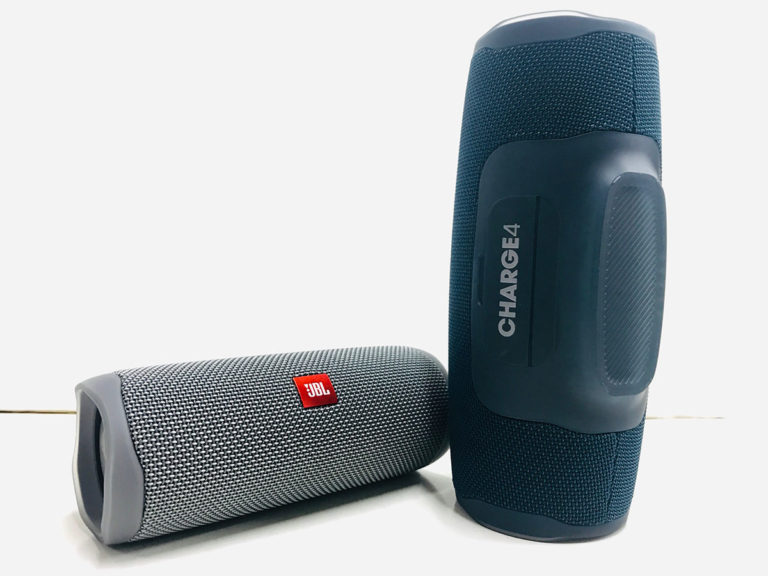
Controls and features JBL Flip 5 vs Charge 4
Both speakers offer the same standard controls, including play/pause, skip track (although you can’t skip backwards) and volume control.
JBL Charge 4 controls and functionality
Calls
Neither of these models has a microphone. And if your mobile device is paired to your speaker when you receive a call, the caller will be heard through your phone’s speaker, not the JBL speaker itself.
Connecting multiple speakers
Some JBL owners will be disappointed here. JBL has updated its "Connect+" feature (used by Charge 4) to "PartyBoost" with the release of the new Flip 5. These features let you pair or sync multiple JBL speakers. But Connect+ and PartyBoost aren’t compatible. So I couldn’t connect the Flip 5 to the Charge 4. So if you buy the latest JBL Flip speakers, you can’t connect them to older models. Sneaky.
Battery life and charging time JBL Flip 5 vs Charge 4
With 20 hours of playtime, the Charge 4 offers 8 hours more than the Flip 5, which only gives you 12 hours of use. It takes 4.5 hours to fully charge the Charge 4, while the Flip 5 needs 2.5 hours. Both models use a USB-C port for charging. (Charging cables are included in the box).
Both speakers have battery level indicators that light up when you switch them on. The Charge 4 uses a row of glowing dots to show how much battery life is left, while the Flip 5 uses a single glowing white line that gets dimmer as the battery starts to run down.
Wired connection
Unlike the Flip 5, the Charge 4 has a 3.5 mm audio input, so you can connect the speaker to your device with a cable. (Extra cable not included). But even when the cable is connected to your device, the Charge 4 still needs to be switched on.
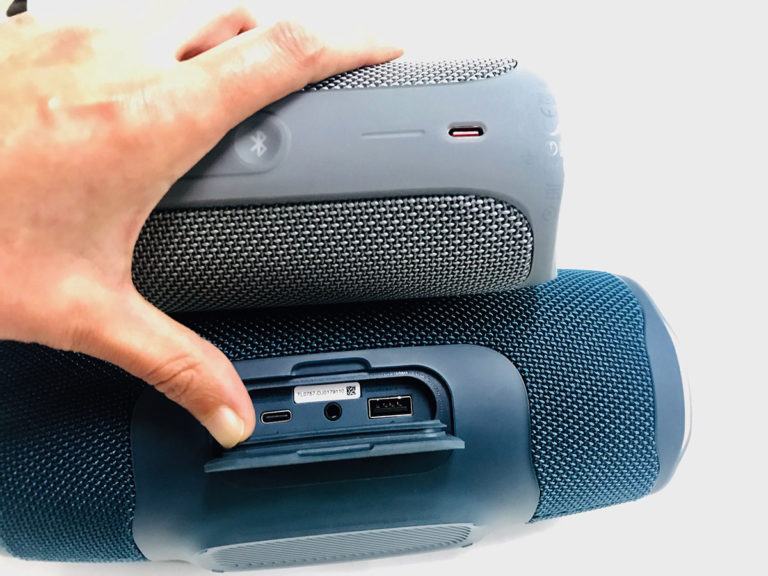
Extra features
One of the main advantages of the larger Charge 4 is, of course, that the speaker also acts as a power bank, so you can top up your mobile device.
Waterproof rating JBL Flip 5 vs Charge 4
Both models have an IPX7 waterproof rating, which means they can be submerged in up to 3 feet of water for around 30 minutes. So if the speaker bobs off your inflatable at the pool, just enjoy the show and crack open a beer. And yes, both speakers can handle a spell in the rain.
Sound performance JBL Flip 5 vs Charge 4
Volume
Surprisingly, the Charge 4 doesn’t get that much louder than the Flip 5. (JBL has cranked up the volume on the Flip since the Flip 4). However, compared to the Flip 5, the Charge 4 shows huge improvements in sound quality, and the expanded soundstage gives a more immersive feel overall. More on this below.
Bass frequencies
As you’d expect, the Charge 4 gives you wider, more powerful bass frequencies. You can almost feel your bellybutton vibrating when the Charge 4 is turned up to max volume. By contrast, the Flip 5 doesn’t deliver nearly as much low end.
Clarity
Another big difference is the clarity. The Charge 4 presents a much more transparent sound, and tracks with dense arrangements are a lot cleaner. So you definitely get a wider and more detailed sound range from the Charge 4.
Soundstage
There’s a huge difference in the sense of space these two models create. The soundstage on the Charge 4 feels huge and sweeping compared to the relatively compact sound of the Flip 5. And this is the biggest improvement you’ll notice when you move up to the larger model. If you’re looking for that big room-filling sound and plan to host more than 10 people at your next pool party, the Charge 4 is ideal. But again, in terms of maximum volume levels there isn’t a massive difference. So if all you need is background music for your 4 p.m. beer pong session, the Flip 5 will do just fine.
Overall comparison JBL Flip 5 vs Charge 4
Both models offer enough volume for a party or cosy get-together. But normally I’d recommend going for the larger Charge 4, given the huge jump in clarity, bass and soundstage. And since the Charge 4 is only slightly more expensive, it seems like a reasonable investment (unless you’re specifically looking for something very small). However, if you’re planning to buy more JBL speakers to build a synchronised multi-speaker system, it’s better to go with the Flip 5. Otherwise you may run into compatibility issues in the future.


Do JBL Bluetooth speakers have voice control?
There’s nothing nicer than being able to tell your JBL speaker from a distance to turn the volume up or down. But which JBL Bluetooth speakers are compatible with, for example, Google Assistant and respond to voice control?
Google Assistant is growing fast and gets new features and more smart support every day. If you want to take all those new features with you on the go, here are the best Bluetooth speakers with Assistant integration. Next time you’re by the pool and need to turn on the lights, or you can’t remember whether you set the thermostat before you left on holiday… or anything else you use your Google Assistant for, having a speaker that doubles as your Assistant is incredibly useful.
And while the current range of Google Home speakers is great for all of that, there’s one problem: they need mains power. If you’re always on the go and need a speaker that can keep up, there are a few good options.
The only thing you really need to keep in mind when looking for a portable smart speaker is that the Assistant needs Wi‑Fi to work. It can’t pull data queries from your phone over Bluetooth. It needs its own connection to use Assistant features. Of course, you can still use it for audio playback over Bluetooth, which is a big part of the appeal here.
If you’re primarily looking for the best Bluetooth speakers on the market, I’d recommend checking out JBL – it makes some of the best portable speakers these ears have ever heard.
JBL Link Bluetooth speakers
So when you combine how great they already are with Google Assistant, you’ve got a winner. A whole family of winners, in fact: there are four different speakers in the Link family, although only two of them are portable. Here’s a quick overview:
JBL Link 10: this is the smallest, most portable and most affordable speaker in the Link family (it’s quite a bit bigger than a Google Home). But don’t be fooled by the small size: JBL can do amazing things in compact packages.
JBL Link 20: a bigger number means a bigger speaker, right? In this case, yes. The Link 20 is basically a larger version of the Link 10, so if you want more bass and a bigger overall sound, go for this one. Just keep in mind that you’ll sacrifice a bit of portability here.
The other two speakers in the Link family are the Link 300 and 500. Since neither of these has a battery, they don’t meet our definition of "portable", but if you’re looking for a large Assistant speaker for the home, they’re definitely worth a look.
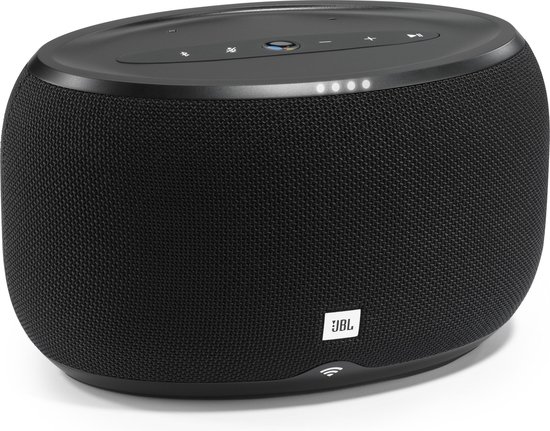
But when it comes to both the Link 10 and 20, they have more going on under the hood than just good sound and Google Assistant. Both speakers are water resistant for ultimate poolside playback, offer 24‑bit / 96 kHz sound quality and can pair with multiple speakers for multi-room playback.
Both speakers also have built-in Casting support, which is superior to Bluetooth playback in almost every way. It pulls audio from the cloud (instead of streaming over Bluetooth), so it can fetch higher-quality tracks for better sound. This is also what allows the speakers to connect in multiple rooms and play in sync. The downside? Casting requires Wi‑Fi.
Write a reply
Related Posts
Stripchat complete guide 2026 – the ultimate handbook for new users, reviews, tips, safety & costs
1. What is Stripchat? Stripchat is an international live entertainment platform focused on interact ...
What’s the difference between the Dyson V8, Dyson V10 and Dyson V11 cordless vacuum?
Dyson has long been the king of the cordless vacuum cleaner, really ever since the DC16 was launched ...
Top 10 best vacuum cleaners of 2024
Everyone needs a vacuum cleaner at home, whether you live in a big or small place. A vacuum cleaner ...

Gardena Sileno models: City, Life and Sileno+ differences
Gardena was founded in 1961 in Ulm (Germany) and is part of Husqvarna Group. Since then, the brand h ...