Top 10 best doorbells with camera
A doorbell with camera is a type of doorbell with a camera integrated into the doorbell mechanism. This lets you see who is at the door before you open it. Some doorbells with camera also offer other handy features, such as the ability to talk to the visitor via an intercom system or control the doorbell remotely through an app on your smartphone.
What are the best doorbells with camera?
Here’s a selection of the best and most popular doorbells with a camera function:
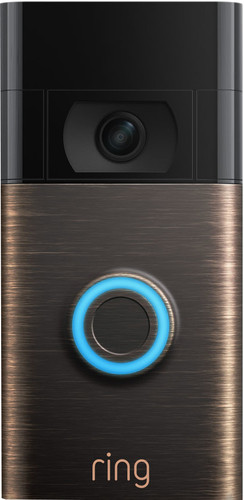
1. Ring Video Doorbell
The Ring Video Doorbell is a popular option thanks to its high image quality and user-friendly app. It also has night vision and can record footage and save it to the cloud.
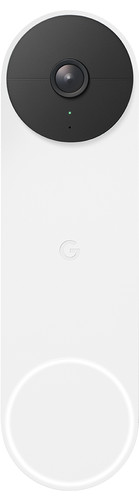
2. Google Nest Hello
The Google Nest Hello is another popular choice, with high image quality and the ability to record and store footage in the cloud. It also has an intercom function and can be linked to Google Assistant.
3. Eufy Video Doorbell Battery Set
The Arlo Video Doorbell has a high-resolution camera and night vision, and can record footage and store it in the cloud. It also has an intercom function and can be connected to Arlo security cameras.
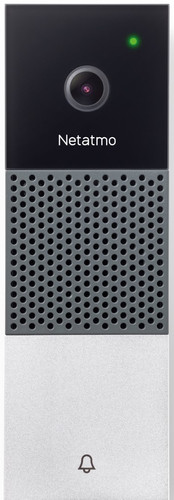
5. Netatmo Smart Video Doorbell
The Netatmo Smart Video Doorbell is a smart doorbell that lets you talk to visitors remotely when you’re not at home. View the camera footage in the Netatmo app on your smartphone. The doorbell works with Apple HomeKit, so you can easily ask Siri to show footage from the doorbell as well. You can connect this doorbell to your existing doorbell chime, so you also hear a sound inside when someone rings. You don’t need a subscription to access all features. Camera footage is stored directly on the built-in memory card. You mount this smart doorbell on the existing wiring of your doorbell, which does require some technical know-how.
6. Ubiquiti UniFi Protect G4 Doorbell
Use the Ubiquiti UniFi Protect G4 Doorbell to keep an eye on your front door from any location. This smart doorbell has a built-in display for showing messages to visitors. You can also talk to people at the door directly through the UniFi Protect app on your smartphone, even when you’re not home. Thanks to the built-in lighting, footage is high quality even in the dark. To use the doorbell, you need a UniFi recorder, which turns the doorbell into part of your personal security system. You mount this doorbell using the wiring of your current doorbell.
7. Alecto ADI-250 Door Intercom
The Alecto ADI-250 is a digital doorbell that’s connected to an intercom. The doorbell has a built-in camera, so you can immediately see on the intercom who is at the door. Thanks to infrared, this is also possible in the dark. The colour screen on the intercom measures 3.5 inches. You connect the intercom to the wiring of your doorbell or use it wirelessly with the included rechargeable batteries. In that case, you place it in the stand anywhere you like in your home. When someone rings, the camera immediately takes a photo with the date and time. Prefer more receivers at home? The ADI-250 can be expanded to up to 4 receivers.
8. Ring Video Doorbell Pro 2 Plugin + Chime Pro Gen. 2
With the Ring Video Doorbell Pro 2 Plugin + Chime Pro Gen. 2 you always know who is at your door, wherever you are. You can see what’s happening at your door from anywhere in the world and, thanks to the 160-degree field of view, what’s going on in the rest of your garden too. Thanks to the increased vertical field of view and HDR image, you see the delivery driver or your guests from head to toe. The included Ring Chime Pro boosts the Wi-Fi signal for Ring products. Because the doorbell and Chime use dual-band Wi-Fi, the signal is less likely to drop than with other Ring doorbells. You’ll also hear an audible signal via the Chime when someone is at the door. The Ring Pro 2 has 3D motion detection: it detects distance, speed, size and direction. This way you can see exactly where motion occurred, up to 9 metres away.

9. Ezviz Battery-powered 2K+ Video Doorbell Kit DB2 Pro
This smart Ezviz DB2 Pro has improved image quality compared to the standard DB2. It’s completely wireless and always shows you who is at the door. Thanks to its 176-degree field of view, you can keep an eye on everything. Via the app you see live 2K+ footage and can talk back to people at your door. The included chime makes a sound when someone rings, and at the same time works as a Wi-Fi booster. This ensures your smart doorbell always has a good connection. The Ezviz stores footage on an SD card of up to 256 GB. Prefer cloud storage as well? Then you pay 4 euro 99 per month.
10. August Doorbell Cam Pro
The August Doorbell Cam Pro has a high-resolution camera and night vision, and can record footage and store it in the cloud. It also has an intercom function and can be connected to the August Smart Lock.

These are just a few examples of doorbells with camera that are popular with consumers. There are many more brands and models to choose from, so it’s wise to compare different options to determine which one best suits your needs.
What should you look out for when buying one?
There are a few things to pay attention to if you want to buy a doorbell with camera:
- Image quality – Check whether the doorbell camera has a high resolution so you can clearly see who is at the door.
- Night vision – If you want to use the doorbell at night as well, it’s useful if the camera has night vision.
- Connection – Check whether the doorbell has a stable connection to your Wi-Fi network so you always have access to the camera.
- Storage – See whether the doorbell can record and store footage so you can view it later. Some doorbells have built-in storage, while others connect to a cloud storage service.
- Ease of use – Look for a doorbell that’s easy to operate and has a user-friendly app.
- Price – Compare different brands and models to determine which one best fits your budget.

How does a doorbell with camera work?
A doorbell with camera works in much the same way as a regular doorbell, with the difference that a camera is integrated into the doorbell mechanism. When someone presses the doorbell, it sends a signal to the indoor unit, such as a screen or a speaker. This allows you to see and hear the visitor via the camera and the intercom system.
Some doorbells with camera also come with an app that lets you operate the doorbell remotely. This allows you to view and use the doorbell from your smartphone, even when you’re not at home.
There are also doorbells with camera that can record and store footage. This can be useful if you want to know who has been at the door while you were away. The recordings can be stored on built-in storage or on a cloud storage service.
In general, a doorbell with camera works via a Wi-Fi connection so you always have access to the camera through your smartphone or another device.
Should you choose a wireless or wired doorbell?
Both types of doorbells have their advantages, so it depends on your personal preferences and needs which is best for you. Below are some points to consider when choosing between a wireless or wired doorbell:
- Installation: A wired doorbell requires a cable from the doorbell mechanism to the indoor unit, which may mean drilling holes in walls or ceilings to hide the cable. A wireless doorbell is easier to install because you only need to connect the doorbell and the indoor unit to the power supply.
- Reliability: A wired doorbell generally has a better connection than a wireless doorbell, as there’s no interference from other wireless devices. This can be useful if you have a doorbell with camera or intercom function, because a good connection is important for clear image and sound quality.
- Flexibility: A wireless doorbell is more flexible than a wired one because you can place the doorbell and indoor unit anywhere in your home without having to worry about laying cables. This can be handy if, for example, you want a doorbell in a place where there’s no power outlet nearby.
- Price: Wired doorbells are usually cheaper than wireless models because they don’t require extra components such as batteries or Wi-Fi connections.
Ease of use: Some people find a wireless doorbell easier to use because they don’t have to trace cables or worry about connecting to a power socket.

In general, a wired doorbell is a good choice if you’re looking for a reliable, affordable option with a strong connection, while a wireless doorbell is more flexible and easier to install. Which one is best for you depends on your personal preferences and needs.
How much does a doorbell with camera cost?
The price of a doorbell with camera can vary widely depending on the brand, model and specifications. In general, doorbells with camera are more expensive than regular doorbells because they offer extra features such as a camera and intercom system.
You can buy a basic doorbell with camera for around 50 euros, but more advanced models can cost several hundred euros. It’s therefore sensible to compare different brands and models to see which one best fits your budget.
Why buy a doorbell with camera function?
Reasons why you might want to buy a doorbell with camera function include:
- Security: With a doorbell with camera function you can see who is at the door before you open it. This can help you feel safer, especially if you live alone or in an area where burglary or other crime is more common.
- Convenience: With a doorbell with camera function you don’t have to walk to the door to see who is there. You can see and hear the visitor via the camera and intercom function, and even talk to them. This is handy if you’re busy in another room or not able to go to the door.
- Monitoring: Some doorbells with camera can record and store footage. This can be useful if you want to know who has been at the door while you weren’t home.
- Pets: If you have pets, it can be reassuring to know who is at the door before you open it, so you can prevent your pet from escaping or getting too excited and noisy.
- Parcel delivery: If you regularly receive parcels, a doorbell with camera can be very handy, as you can see who is at the door before you open it. You can also make arrangements with the delivery driver about where to leave the parcel if you’re not home.

Write a reply
Related Posts
Stripchat complete guide 2026 – the ultimate handbook for new users, reviews, tips, safety & costs
1. What is Stripchat? Stripchat is an international live entertainment platform focused on interact ...
What’s the difference between the Dyson V8, Dyson V10 and Dyson V11 cordless vacuum?
Dyson has long been the king of the cordless vacuum cleaner, really ever since the DC16 was launched ...
Top 10 best vacuum cleaners of 2024
Everyone needs a vacuum cleaner at home, whether you live in a big or small place. A vacuum cleaner ...

Gardena Sileno models: City, Life and Sileno+ differences
Gardena was founded in 1961 in Ulm (Germany) and is part of Husqvarna Group. Since then, the brand h ...