The 10 best Chromebooks for school

You probably hear the word Chromebook more and more often, but what actually is a Chromebook? To keep it simple: a Chromebook is a laptop that’s designed for working almost entirely online. A Chromebook has its own operating system, Chrome OS, developed by Google. Regular laptops usually run on Windows and MacBooks on macOS. Just like a MacBook, a Chromebook doesn’t have a traditional hard drive. It does have an SSD, but it’s just large enough to run the operating system. No worries though: you no longer really need a hard drive, because you work in the cloud and store your files there. That may sound complicated or a bit scary at first, but you’ll pick it up in no time.
At many secondary schools, students are expected to buy or rent their own Chromebook. Renting is an option, but buying is usually cheaper in the long run. A Chromebook doesn’t have to be expensive at all.
So what exactly is ChromeOS?
Google has made the ChromeOS operating system as lightweight as possible and preinstalled it with just Google Chrome. You do everything else through the browser, so you really don’t need more.
With a Chromebook that’s all you need, because you carry out all your tasks in the browser. You also work completely in the cloud and manage files with services like Dropbox, OneDrive or Google Drive.
You use streaming services such as Spotify for music and Netflix and YouTube to watch videos and movies.
What are the pros and cons of a Chromebook?
Advantages of a Chromebook:
- A Chromebook is very fast
- Easy to use
- Chromebooks are relatively inexpensive
- Lower risk of viruses
- Works well together with the Android system
- Generally long battery life
- Very quiet
- Very lightweight
Disadvantages of a Chromebook:
- A Chromebook isn’t suitable for heavy programs
- A stable internet connection is essential
- Not designed for gaming

Choose a Chromebook if:
- You’re often on the move and need long battery life.
- You don’t need much storage and mainly work in the cloud.
- You mostly take notes for work or study.
- You occasionally edit photos using an app from the Play Store.
- You play simple games such as Clash of Clans.
Which Chromebook is the best choice?
That depends entirely on what you’re going to use the Chromebook for. When you compare models, pay attention to different aspects and decide what matters most to you. Take the working memory, also known as RAM. If you usually have 1 to a maximum of 3 tabs open in your browser, 2GB of RAM is enough. Otherwise, you’ll want at least 4GB of RAM. And if your budget allows, a Chromebook with 6 or 8GB of RAM is recommended.
Another important comparison point is the screen. If you’re on the road with your laptop all day, it’s smarter to choose a Chromebook with a smaller screen.
Finally, the more expensive models usually have a better display with higher brightness, which helps when you’re working in bright sunlight.
For a complete comparison, also check chromebooksvergelijken.nl.
Top 10 best Chromebooks for school
Best Chromebook brands:
- Acer
- HP
- Lenovo
- Asus
So a Chromebook is a special type of laptop where everything happens online. That makes them lighter, gives them strong battery life and makes them ideal for use at school. You’ll find the 10 best Chromebooks for school right now below. Make the most of it!
1. Acer Chromebook 315 (€ 339,-)
With this Acer Chromebook 315 you can write reports, send emails and watch movies on Netflix. The touchscreen lets you swipe through all your files and photos with your fingers. Do you often chat with friends via Skype or another video chat program? The webcam has a wide 170-degree viewing angle so people around you can also join the conversation. This Acer runs on Chrome OS. With this energy-efficient operating system you work from the cloud and the Chrome browser. You log in with your Google account and work in online apps like Google Docs and Office 365.
It’s available on bol.com for 339,- – click here

2. Lenovo IdeaPad 3 Chromebook 15IJL6 82N40026MH (€449,-)

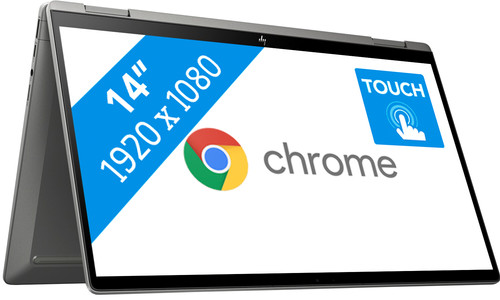
3. HP Chromebook x360 14c-cc0735nd - 14 inch €499,-

4. Acer Chromebook Spin 311 CP311-2H-C3DE (€ 249,-)

5. Acer Chromebook 315 CB315-3HT-C4Y8 - 15 inch (€399,-)
This Acer Chromebook stands out with its Full HD display, which is ideal for watching movies and series, and its touchscreen. On top of that, the Chromebook has long battery life. A Chromebook with average speed is suitable for slightly more demanding tasks. You can easily focus on a single study report, tomorrow’s presentation or editing your holiday photos in the cloud.
Chromebook features:
- Touchscreen display.
- Full HD screen for movies & series.
- Plastic casing.
- QWERTY keyboard layout.
- ChromeOS operating system that works much like a smartphone, letting you work with various apps. So it’s different from a Windows laptop.

6. ASUS Chromebook C223NA-GJ0088 - 11.6 inch (€215,-)
This ASUS C223NA Chromebook is unique thanks to its Full HD display, which is ideal for movies and series, and its long battery life. It also offers high speed, allowing you to switch smoothly between all your Chrome apps. A Chromebook with average speed can handle slightly more demanding programs, so you can easily focus on a single study report, tomorrow’s presentation or editing holiday photos in the cloud.

7. Acer Chromebook 315 CB315-3H-C7TG - 15.6 inch (€309,-)
This Acer 315 CB315-3H-C7TG Chromebook is unique thanks to its Full HD display, ideal for movies and series, and its large screen size. The Chromebook also offers long battery life.
A Chromebook with basic speed is suitable for basic tasks such as googling, saving recipes and emailing.

Flip the touchscreen 360 degrees and use the Acer Chromebook Spin 513 CP513-1H-S2LW as an Android tablet as well. Swipe your way through web pages or play games like Angry Birds with your fingers. Thanks to the low weight of 1.2 kilograms, you can take this 2-in-1 with you wherever you go. A Chromebook runs on Chrome OS instead of Windows. With this operating system, you work online from the web browser in apps such as Google Docs or PowerPoint Online. You can also download Android apps from the Google Play Store.

9. Asus Chromebook Flip C434TA-AI0303 - 14 Inch (€349,-)
The Asus Chromebook Flip C434TA-AI0303 is an ideal Chromebook for watching movies and series thanks to its flip touchscreen, ultra-thin bezels and vivid color reproduction. The fast and silent Intel Core M processor lets you perform multiple tasks quickly and at the same time. Finally, this Chromebook has an attractive design, and the 14-inch screen offers enough workspace while still being compact enough to carry with you.

10. HP Chromebook x360 14c-ca0001nd (€459,-)
Write a reply
Related Posts
Stripchat complete guide 2026 – the ultimate handbook for new users, reviews, tips, safety & costs
1. What is Stripchat? Stripchat is an international live entertainment platform focused on interact ...
What’s the difference between the Dyson V8, Dyson V10 and Dyson V11 cordless vacuum?
Dyson has long been the king of the cordless vacuum cleaner, really ever since the DC16 was launched ...
Top 10 best vacuum cleaners of 2024
Everyone needs a vacuum cleaner at home, whether you live in a big or small place. A vacuum cleaner ...

Gardena Sileno models: City, Life and Sileno+ differences
Gardena was founded in 1961 in Ulm (Germany) and is part of Husqvarna Group. Since then, the brand h ...